Imagine your Shopify store humming along, and just as a bestseller is about to sell out, inventory magically replenishes itself. That’s not magic; it’s the power of an automated purchase order system. This approach takes procurement from a frantic, manual chore and turns it into a smart, self-managing part of your business.
Relying on manual purchase orders is like hand-delivering mail in an age of instant messaging. It’s painfully slow, riddled with costly errors, and a massive time-sink. For any growing D2C brand, this old-school process quickly becomes a bottleneck, leading to stockouts during peak season or, just as bad, cash trapped in overstocked items nobody wants.
Every hour spent buried in spreadsheets is an hour you can’t get back—time you should be spending on marketing, product development, or talking to your customers.
An automated purchase order system is essentially a smart platform that creates, sends, and tracks your POs based on rules you set. It acts as a vigilant inventory manager that never sleeps, using real-time data from your store to make intelligent buying decisions.
Moving to automation isn't just about swapping a spreadsheet for some software. It's a fundamental shift in how you run your business. You stop being reactive and start being proactive.
Instead of scrambling to reorder after a product sells out, the system sees it coming. It anticipates the need based on how fast things are selling and how long it takes your suppliers to deliver.
This strategic shift allows your brand to maintain optimal stock levels automatically. It ensures you have enough product to meet demand without tying up capital in excess inventory, striking that perfect balance needed for profitable growth.
If you’re running a Shopify store, you know the headaches of manual procurement all too well. An automated system tackles these challenges head-on by giving you a reliable framework for growth.
Here’s a quick look at what changes:
This isn't just another tool; it's a real competitive advantage. By automating this critical function, you build a more resilient, efficient, and scalable foundation for your e-commerce brand.
To really see the difference, it helps to put the old and new ways side-by-side. The table below breaks down the stark contrast between a manual process and an automated one.
| Process Step | Manual PO Process (The Old Way) | Automated PO System (The New Way) |
|---|---|---|
| Trigger | Relies on manual stock checks, often leading to reactive ordering. | Triggered automatically by preset reorder points based on live data. |
| Creation | Requires manual data entry into a spreadsheet or template. | POs are generated instantly with accurate product and supplier info. |
| Approval | Involves slow email chains or physical sign-offs, causing delays. | Streamlined digital workflows send approvals directly to the right person. |
| Tracking | Manual follow-ups with suppliers are needed to check order status. | Provides real-time tracking and automated status updates for all orders. |
As you can see, the shift is dramatic. One path is full of friction, delays, and guesswork, while the other is built for speed, accuracy, and strategic insight. By letting technology handle the grunt work, you empower your team to focus on what truly matters: scaling your brand. A platform like Tociny.ai can bridge this gap, connecting your real-time inventory data to intelligent purchasing workflows.
An automated purchase order system isn't some kind of business black magic. It’s a logical, data-driven process that takes all the manual guesswork out of restocking. Think of it as a smart assistant for your inventory—one that’s constantly watching, anticipating, and acting on your behalf to keep your supply chain humming.
The entire thing runs on a foundation of simple rules you define. Let's break down how it all comes together.
First things first, you have to give the system its instructions. This is where you define the reorder points and purchasing rules that serve as the system's brain. A reorder point is just the minimum stock level an item can hit before the system knows it's time to order more.
But you don't just pull a number out of thin air. A solid setup looks at two key factors:
By setting these rules, you're basically teaching the system the unique rhythm of your business.
With the rules in place, the system needs to watch your stock. It becomes a pair of digital eyes, monitoring your inventory levels 24/7. Every single time a sale comes through your Shopify store, the system instantly deducts that unit from your available stock count.
This constant, real-time tracking is what makes the whole thing work. Unlike manual counts that are outdated the second you finish them, an automated system gives you a live, dynamic picture of every single SKU.
This flowchart paints a clear picture of the difference between the old manual way and the new automated approach.
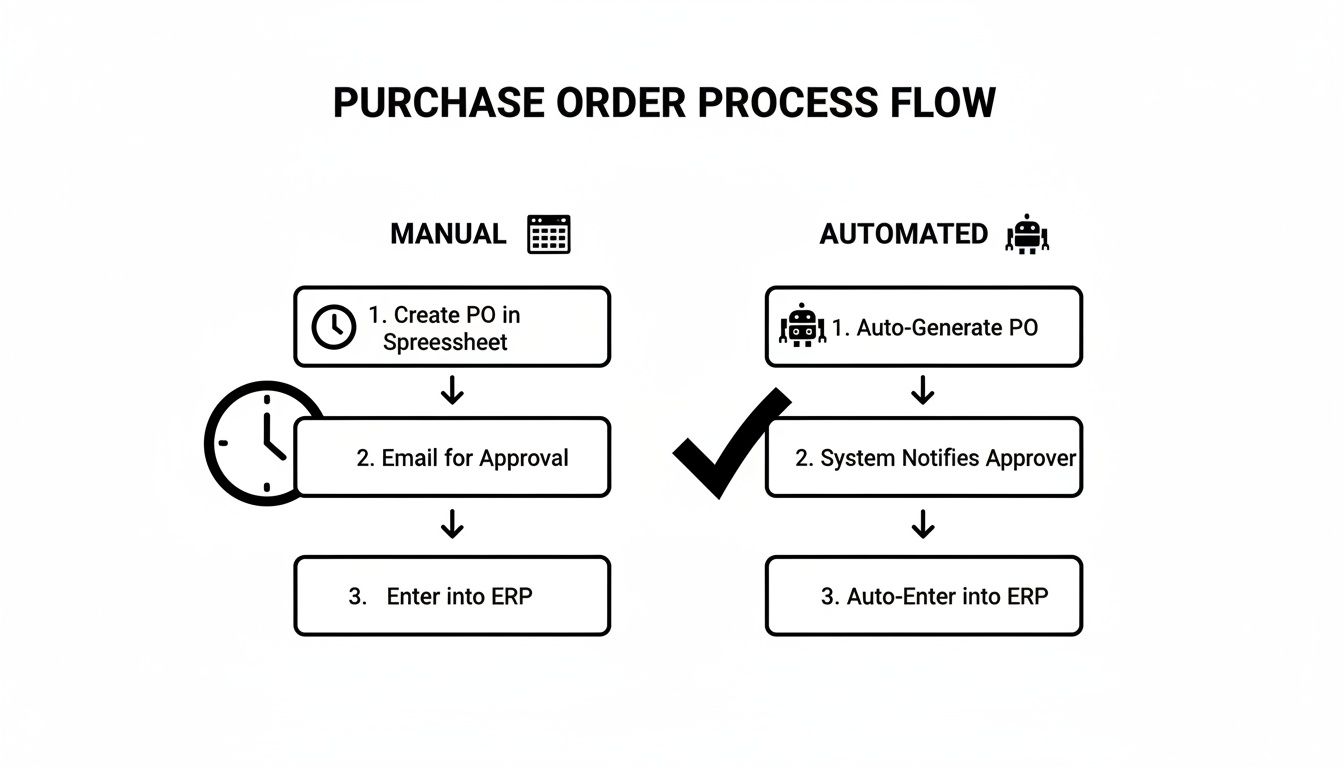
You can see how the manual process is reactive and full of delays, while the automated workflow is proactive and keeps things moving.
Here’s where the magic really happens. The second a product's stock level drops to its reorder point, the system springs into action and automatically generates a new purchase order. It pulls all the necessary info—supplier details, SKUs, agreed-upon pricing, and the right quantity—without you having to lift a finger.
A well-configured automated PO system doesn't just order a random amount. It can be set to order enough stock to bring you back to an optimal level, factoring in current sales trends to prevent both under-ordering and overstocking.
Once the PO is drafted, it doesn't just get fired off into the void. The system sends it through a pre-defined approval workflow. For example, you might set a rule that orders under $500 are approved automatically, but anything larger gets routed to a manager for a quick digital sign-off.
After it's approved, the system emails the official purchase order directly to the right supplier. This entire sequence, from the low-stock trigger to the supplier receiving the PO, can happen in minutes instead of days. It completely shrinks your procurement cycle. For a deeper dive, exploring various intelligent automation use cases can show just how much workflows like this can be transformed.
The broader market for this kind of software is booming, projected to hit $8,767.12 million by 2033 with a strong 11.3% compound annual growth rate. For Shopify merchants, this trend means moving away from clumsy, error-prone spreadsheets. AI-driven platforms can automate PO creation, approval, and tracking, helping to slash stockouts by 30-50%, according to industry benchmarks. Platforms like Tociny.ai offer the tools to manage your automated purchase order generation and keep your inventory perfectly balanced.
Let's be honest: adopting an automated purchase order system isn't just about shuffling digital paperwork faster. For a growing Shopify brand, it's a strategic overhaul that turns your procurement process from a necessary evil into a genuine driver of growth. The positive effects touch everything from your cash flow and inventory to the relationships you have with your suppliers.
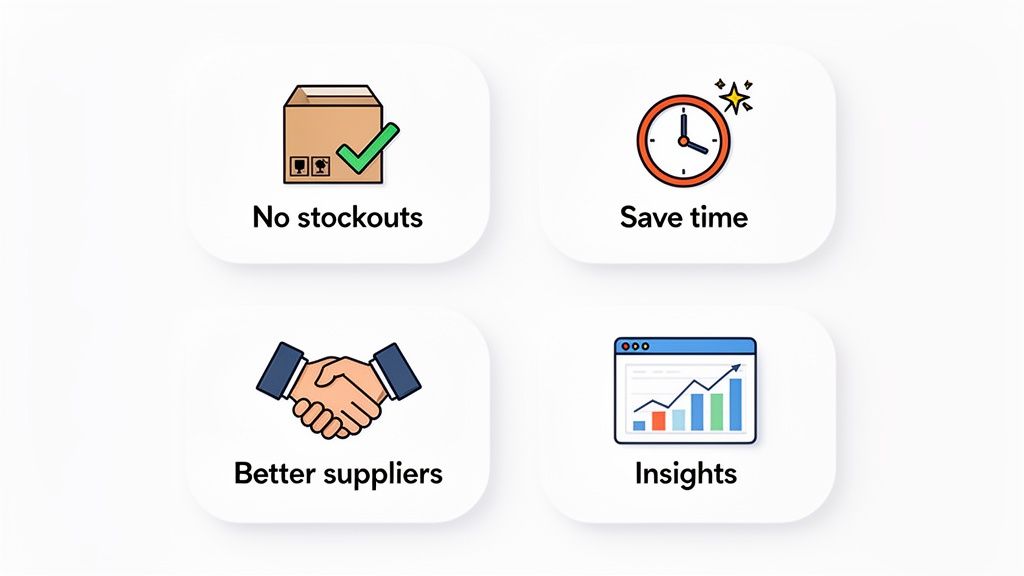
At its core, automation gives you back the one thing you can't buy more of: time. It also delivers the kind of financial clarity and operational backbone you need to scale with confidence. Let's dig into the four main benefits that will make a real difference to your bottom line.
The most immediate win you'll see from an automated PO system is finding that sweet spot in your inventory. This means finally waving goodbye to the twin headaches of e-commerce: frustrating stockouts that stop sales in their tracks and bloated overstock that locks up your cash.
When you're doing things manually, timing your reorders perfectly is a shot in the dark. You either order too late and watch sales slip away, or you order way too much "just in case" and end up with capital trapped in products that aren't moving.
Automation cuts through the guesswork by using real-time data to keep every SKU at its ideal stock level.
This isn't a small thing. For Shopify merchants in industries like food & beverage or home goods, automated POs can slash the 20-30% overstock waste that often plagues businesses stuck with manual processes.
Manual purchasing is a black hole for your time. Think of all the hours spent eyeballing stock levels, updating spreadsheets, sending emails to suppliers, and then chasing down approvals. It all adds up, pulling you and your team away from work that actually grows the business.
An automated system gives you that time back. By handing off the repetitive, mind-numbing tasks, it creates a ripple effect of efficiency. Manual data entry is not only slow but also a huge source of expensive mistakes, like ordering the wrong quantity or typing in the wrong shipping address.
Automated workflows can slash approval cycles by over 70%. A process that used to take days can now be done in minutes. That speed translates directly to faster order fulfillment, happier suppliers, and a business that can pivot on a dime.
Your suppliers are your partners, and a messy, chaotic purchasing process puts a real strain on that partnership. Late orders, inaccurate POs, and delayed payments send a clear signal that you're disorganized.
An automated PO system turns you into the kind of customer suppliers love to work with. They get clear, accurate, and timely orders every single time. That consistency builds a foundation of trust and can lead to some real perks:
Finally, every automated purchase order is another piece of valuable data. When all this information is collected in one system, it creates a clean historical record of your purchasing. Instead of being lost in a mess of emails and spreadsheets, your procurement data becomes a powerful, accessible asset.
This centralized data lets you easily spot spending patterns, track how well your suppliers are performing, and monitor lead times. There's a reason the procurement software market is booming—it hit $8.89 billion in 2025 and is projected to reach $20.75 billion by 2034. A huge part of that growth is the demand for data, with the retail and e-commerce sector making up 23.04% of the market as merchants hunt for a competitive edge. You can see more details about the procurement software market growth on fortunebusinessinsights.com.
With built-in dashboards and analytics, you can turn that raw data into real intelligence. You'll be able to quickly see who your most reliable suppliers are, notice when product costs are creeping up, and make smarter, more profitable buying decisions for the future.
Let's be clear: moving to an automated purchase order system isn't some abstract corporate goal. It’s a hands-on project. For any Shopify store owner, the first step is taking a hard, honest look at how you’re currently running things. This is all about building a solid foundation for a system that will soon become the backbone of your inventory management.
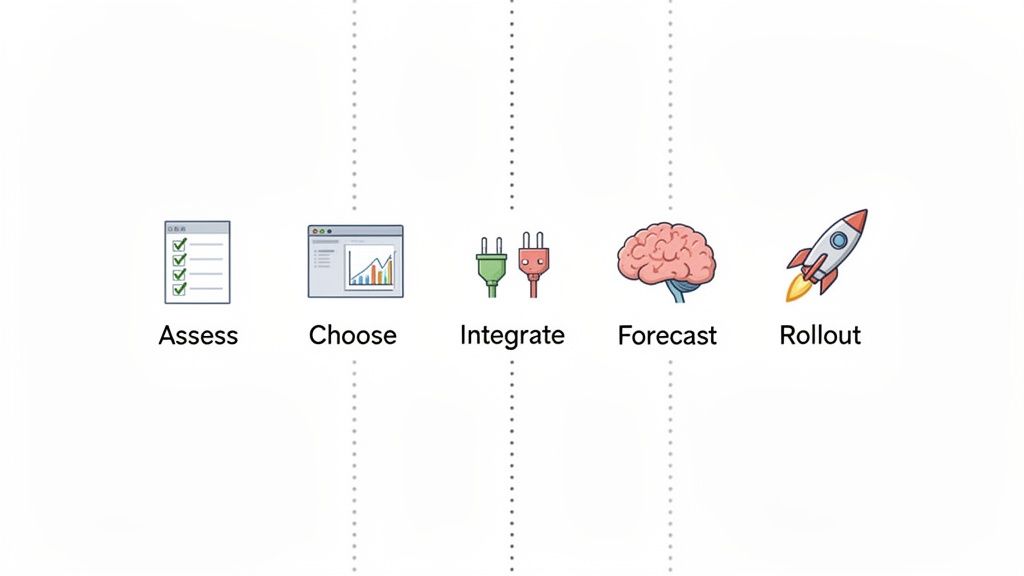
Think of this as your roadmap. We’ll walk through how to get from manual chaos to automated clarity, step-by-step, without blowing up your day-to-day business.
Before you can fix a problem, you have to know exactly what it looks like. Start by mapping out your current procurement process—from the moment someone flags low stock all the way to paying the supplier invoice. This audit is where you'll find the hidden costs and bottlenecks that are quietly draining your resources.
Get real with yourself and ask a few simple questions:
Answering these questions turns the fuzzy idea of "being more efficient" into a solid business case backed by real numbers. For a wider view, this guide on how to automate business processes offers some great strategies for rolling out new systems smoothly.
Once you know what you need, you can start looking at software. Not all tools are built the same, and the best fit for your Shopify store depends entirely on your specific pain points. You’re looking for a platform that solves your biggest headaches today and has the chops to grow with you tomorrow.
Here’s your non-negotiable software checklist:
Remember, you're not just buying a tool; you're finding a partner. Pick a provider that gets the unique hustle of D2C e-commerce.
An automated PO system sitting on its own is a missed opportunity. To get that true, end-to-end automation, it needs to talk to the other software you rely on. The whole point is to create one, uninterrupted flow of information.
The two most critical integrations are your:
This integration is what kills the soul-crushing manual work of reconciliation. When goods are received, the system creates the purchase receipt in your ERP or accounting software. Your financial records and inventory counts stay perfectly in sync, always.
The forecasting engine is the brain of this whole operation. This is where you feed the system the data it needs to start making smart purchasing decisions on its own. It chews on historical sales data and supplier lead times to calculate dynamic reorder points for every single SKU.
A more advanced tool like Tociny.ai can even factor in things like seasonality and market trends to get even sharper.
Setting this up properly is what flips your procurement from a reactive, fire-fighting task into a proactive, strategic advantage. Getting the details right matters, and you can learn more about exactly how to calculate the reorder point to really dial in your system’s effectiveness.
Getting an automated purchase order system up and running is a major win, but the real magic happens when you treat it like a living part of your business, not a one-time project. For this to really pay off in the long run, you'll need to give it some ongoing attention and refinement. Think of it like a high-performance car—it needs regular tune-ups to stay on the track and deliver peak results as your business grows.
This isn't about micromanaging your new system. It's about building smart, simple routines to keep your automation sharp, accurate, and perfectly aligned with where your business is headed.
Your reorder points are the brains of the operation. One of the most common mistakes merchants make is setting them once and then walking away, which inevitably leads to creeping overstock or painful, surprise stockouts. Market trends shift, a new product suddenly takes off, or seasonal demand changes everything. Your reorder points have to be just as dynamic.
Block out time quarterly or twice a year to review your key products. Jump into your sales data from a platform like Tociny.ai to see how quickly things are moving and spot any changes.
This kind of proactive check-up ensures your automated PO system is always working with the freshest information, making smarter decisions that protect both your sales and your cash flow.
An automated system is only as reliable as the data you feed it. Inaccurate or outdated information is like putting sugar in the gas tank—it’s going to grind everything to a halt sooner or later. The usual suspects? Messy supplier contacts and product data.
A single incorrect supplier email can stop a critical PO in its tracks. One wrong product cost can throw off your financial forecasts for months.
Create a "single source of truth" for all your procurement info. Make it a strict rule: any updates to supplier contacts, pricing, or product SKUs must be made immediately within your central system. This kind of data hygiene is non-negotiable for automation you can actually trust.
Automation is about moving faster, not losing control of your finances. A key best practice for scaling your automated purchase order system is to build clear, tiered approval workflows. This keeps essential oversight in place without creating the very bottlenecks you were trying to get rid of.
For instance, you could set up rules like these: 1. Orders under $1,000: Go through automatically. No human touch needed. 2. Orders between $1,001 and $5,000: Need a quick sign-off from an operations manager. 3. Orders over $5,001: Require approval from a director or the founder.
This structure lets your team move fast on routine restocks while ensuring that major expenses get the strategic review they deserve. It's the perfect balance between speed and fiscal responsibility. And the growth in this space is undeniable—the purchase order matching AI market, valued at $2 billion in 2025, is projected to hit $4.85 billion by 2029. Brands who get on board early are already seeing manual errors drop by up to 90%. You can check out more on AI's impact on purchase order matching on researchandmarkets.com to see how this technology is shaping procurement's future.
Finally, don't forget that every single purchase order your system fires off is a valuable data point. This information is gold—don't let it just sit there. Dig into the analytics and reporting features of your platform to get some serious leverage in your supplier negotiations.
Next time you talk to a supplier, come to the table armed with hard data on your order volume, payment history, and their delivery performance. You can use this to negotiate better pricing, more favorable payment terms, or lower minimum order quantities. This is how your purchasing function stops being a simple cost center and starts becoming a powerful engine for improving your bottom line.
Rolling out an automated purchase order system can feel like a massive win for your brand. But choosing the right software is only half the battle; knowing what not to do is just as important. Steering clear of a few common traps can save you from costly errors, wasted time, and the deep frustration of a powerful tool that just isn't working for you.
A successful launch isn't just about the tech. It’s about the people you have, the data you feed the system, and the processes you build around it. By understanding these pitfalls, you can navigate your implementation with confidence and set your Shopify brand up for real, long-term success.
One of the most common mistakes is picking a system that only solves today's problems. A tool that handles 50 orders a month perfectly might completely fall apart when you hit 500. When your order volume grows—and you definitely want it to—a system that can't keep up becomes a new bottleneck, dragging you right back into the manual chaos you were trying to escape.
You have to think ahead. When you're vetting software, ask them directly how their system handles increased complexity. Can it manage more suppliers, a bigger SKU catalog, and multiple warehouses without grinding to a halt? Choosing a platform built for growth ensures your investment pays off for years to come, not just for the next quarter.
You could have the slickest automation tool on the market, but if your team doesn't know how to use it—or worse, doesn't trust it—its value craters. Just dropping a new system on your team and expecting them to figure it out is a recipe for disaster. Resistance to change is human nature, and without proper training, people will inevitably slide back to their old, familiar spreadsheets.
The best way to prevent this is to involve your team from the very beginning. Explain the "why" behind the change, showing them how it will get rid of tedious tasks and free them up for more impactful work. Provide clear, hands-on training sessions and create simple documentation they can reference later.
When your team sees automation as a tool that helps them, not something that replaces them, they become champions for the new system. This buy-in is absolutely essential for a smooth transition and is the real key to unlocking the efficiency gains you’re after.
An automated purchase order system is only as smart as the data it’s given. If your product information, supplier lead times, or pricing details are a mess, the system will just automate those mistakes with ruthless efficiency. This is the classic “garbage in, garbage out” scenario, and it can lead to ordering the wrong items, using incorrect costs, and creating massive financial headaches.
Before you even think about going live, commit to a thorough data cleanup. Verify every single piece of information that will feed into the system:
Maintaining this data hygiene isn't a one-and-done task. Think of it as an ongoing process that ensures your automation remains a reliable, trustworthy part of your operations.
Finally, it’s absolutely possible to have too much of a good thing. While the whole point is to cut down on manual work, removing human oversight entirely is a dangerous game. A simple typo in a reorder point or a glitch in a data feed could trigger a massive, accidental order for thousands of units, potentially tying up huge amounts of cash you can’t afford to lock down.
The solution is to build in smart checkpoints. Use approval workflows for large orders, allowing a human to give a final sign-off before a significant chunk of money is spent. Set up alerts for unusual activity, like a PO that is 10x the normal quantity. This balanced approach gives you the speed of automation with the critical thinking and final say of a human expert. It's the best of both worlds.
Switching over to an automated purchase order system is a big move, and it’s natural to have a few questions. Let's tackle some of the most common ones we hear from Shopify merchants to help you get a clearer picture.
The price tag for an automated PO system can really vary. You'll find simpler Shopify apps that start around $20-$50 per month for basic automation. On the flip side, more powerful, standalone platforms with deep analytics can run anywhere from several hundred to thousands of dollars a month.
But the real story isn't the upfront cost—it's the return you get. Think about it: if a new system prevents just one expensive stockout of a bestseller or frees up 10 hours of your team's time every single week, it’s probably already paid for itself. When you’re looking at options, focus on transparent, scalable pricing that can grow with your business, not get ahead of it.
Absolutely. This is a super common worry, especially for brands that work with a mix of suppliers, from huge manufacturers to small, family-run workshops. The good news is that modern systems are built to handle this exact situation.
Most platforms can automatically generate a professional-looking PDF purchase order and email it directly to any supplier you work with. They don't need any special software or tech skills on their end. This way, you get the benefits of an automated workflow without forcing your entire supplier network to change how they operate. For those who are open to it, many systems also offer a simple supplier portal where they can log in to view and confirm orders, which just makes communication even smoother.
This is where the magic really happens. Think of inventory forecasting and automated purchase orders as the “brain” and “hands” of your entire procurement process. They’re a powerful duo.
A forecasting tool, like the engine inside Tociny.ai, is the brain. It digs into your historical sales data, seasonal trends, and market shifts to predict what your customers will want next. It tells you what to order and how much. The automated PO system then acts as the hands, taking that smart data and actually placing the orders.
This partnership is what shifts your inventory management from being reactive (scrambling to reorder when you're low) to being truly predictive. The forecasting tool gives you the intelligent recommendations, and the automation system pulls the trigger at the perfect moment to keep your stock levels just right. You end up having exactly what your customers want, right when they want it.
Ready to stop guessing and start forecasting? Tociny.ai replaces messy spreadsheets with clear, AI-powered inventory insights. See how much stock you really need and make smarter purchasing decisions. Get early access and see what's possible.
Tociny is in private beta — we’re onboarding a few select stores right now.
Book a short call to get early access and exclusive insights.