When you're running a small business, managing your inventory well means more than just keeping track of boxes on a shelf. It’s a full-on strategy that involves knowing your stock levels, predicting what customers will want next, setting smart reorder points, and having the right tools to avoid the dreaded stockout or the cash-draining overstock.
Get this right, and your products transform from a potential headache into a powerful competitive edge, freeing up your cash flow and keeping customers happy.

Let's be real for a minute. That manual spreadsheet you've been clinging to? It's probably costing you a lot more than you think. Poor inventory control isn't just a minor annoyance; it's a direct hit to your bottom line and your brand's reputation.
It kicks off a chain reaction of problems that can mess up your entire operation. You'll see frustrating stockouts that send your hard-won customers straight to a competitor. On the flip side, you'll have costly overstock, with your cash tied up in products that just aren't moving.
Learning how to manage inventory isn't just about counting. It's a foundational strategy for building a business that can not only survive but thrive and scale. When you nail it, you directly boost profits, build customer loyalty, and gain the flexibility to pivot when the market shifts.
A lot of small business owners underestimate just how much disorganized inventory can hurt their finances. Every single product sitting on your shelf represents cash—cash you could be using for marketing, developing new products, or funding other growth plans. When that inventory just sits there, so does your cash.
This isn't a rare problem. As of 2025, a shocking 39% of small businesses in the U.S. are still trying to track inventory by hand or, even worse, not tracking it at all.
This leads to some painful, real-world consequences. About 35% of businesses admit they've shipped an order late because they sold an item that wasn't actually in stock. To make matters worse, 33% are still wrestling with supply chain delays left over from the pandemic, which only amplifies the damage from not knowing what you have on hand.
Getting a handle on your inventory is one of the most powerful levers you can pull for immediate business improvement. It transforms guesswork into a predictable system for growth, ensuring you have the right products, in the right quantity, at exactly the right time.
This guide is your roadmap to taking back control. We’re going to break down the essentials—like SKU creation, demand forecasting, and calculating reorder points—into simple, actionable steps.
The goal here is to help you shift from a reactive, "firefighting" mode to a proactive, strategic approach. You’ll learn how to turn your inventory from a source of stress into one of your greatest assets. For more hands-on advice, check out these small business inventory management tips for success.
Before you can even think about forecasting or figuring out when to reorder, you have to get brutally honest about what you actually have in stock. This is the ground floor. It’s about creating a simple, logical language for your products and getting an accurate baseline count.
Everything else in inventory management rests on this foundation. Mess it up, and you’re just guessing. Get it right, and you're building a system that anyone on your team can understand, from the stockroom to the checkout counter.
A Stock Keeping Unit (SKU) is just an internal code—your product’s unique fingerprint. Unlike a universal barcode (UPC) that identifies a product everywhere, a SKU is your system for telling apart different sizes, colors, and styles.
Good SKU creation isn’t about generating random numbers. It’s about embedding logic right into the code so it’s instantly recognizable.
Let's say you run a boutique selling t-shirts. A lazy SKU might be "TSHIRT1." A smart SKU, on the other hand, tells a story.
Consider a simple, logical structure:
Using this, a "Retro Wave" graphic tee in navy blue, size large, becomes:
Instantly, you know what you're looking at. RW is the Retro Wave design, NAV is the color, and L is the size. No need to consult a spreadsheet or a cheat sheet. This simple clarity speeds up everything, especially picking and packing orders.
Once your SKU system is mapped out, it’s time to establish your ground truth with a full physical inventory count. Yes, it’s tedious. You’ll be manually counting every single item in your stockroom, warehouse, and on the sales floor. But it's absolutely non-negotiable.
This initial count creates the accurate baseline that all your software will depend on. If you start with bad data, every report and forecast will be built on a lie. My advice? Plan to do this after hours to avoid disrupting sales.
Pro Tip: Don't try to be a hero and do it all yourself. Use a two-person team. One person counts, and the other records. This simple check-and-balance system is a lifesaver and dramatically cuts down on human error.
A full-blown physical count is a massive headache, which is why most businesses only stomach it once a year. The problem? A lot can go wrong in 12 months. That’s where cycle counting changes the game.
Instead of shutting everything down for an annual count, cycle counting is about counting small, manageable sections of your inventory on a rotating schedule. For instance, you could count your top 20% of best-sellers every month, the next 30% every quarter, and the rest just twice a year.
The benefits here are huge:
This commitment to accuracy has a real financial impact. The average retail business operates with a shockingly low 66% inventory accuracy. But just implementing regular audits can slash overall inventory costs by up to 12% by cutting waste and preventing stockouts. You can find more data on how these important inventory management statistics directly impact small businesses.
By nailing your SKU system and embracing regular cycle counts, you’re not just organizing your stockroom—you’re building a reliable foundation for every other smart inventory decision you’ll make.
Alright, you’ve got your SKUs in order and a solid count of what’s on your shelves. Now for the fun part: moving from just counting stuff to strategically predicting what your customers will want and when. This is the core of smart inventory management—knowing exactly what to order and precisely when to do it.
Think of it this way: without this step, you're just guessing. You might get a big order after a great sales week, tying up cash in products that will just sit there. Or worse, you under-order right before a seasonal rush and leave a ton of money on the table. Getting a handle on forecasting and reorder points turns inventory from a constant headache into a predictable, profit-driving part of your business.
"Demand forecasting" sounds like something only a data scientist could love, but for a small business, it just means looking at the data you already have. Your sales history, especially from a platform like Shopify, is an absolute goldmine. It shows you which products are your steady sellers, which are seasonal hits, and which ones are, well, duds.
Start by pulling your sales reports from the last 12–24 months. You’re looking for patterns and clues:
This visualization breaks down the foundational flow of getting your inventory system ready for this kind of analysis.
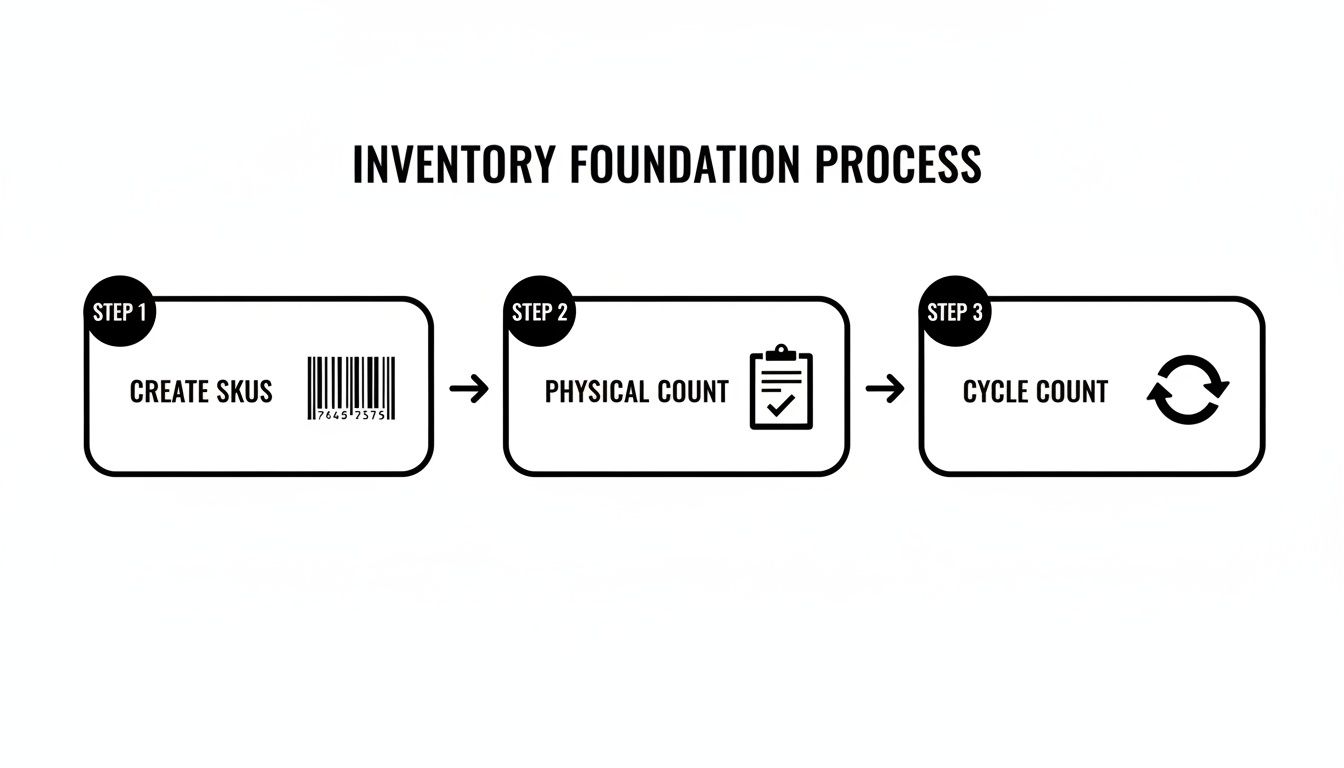
It’s a simple loop: create clear SKUs, get an accurate physical count, and then use regular cycle counts to keep everything accurate. You can't build a reliable forecast on a shaky foundation of messy data.
The payoff for this effort is huge. One McKinsey Retail Operations Study found that businesses using data to manage their inventory saw a 23% reduction in stockouts and an 18% decrease in carrying costs. For a small business, that means more cash in your pocket and customers who can always find what they want.
Forecasting tells you what you’ll likely sell. Your reorder point (ROP) is the magic number that tells you when to place your next order so you don't run out. It's a specific stock level that acts as a trigger. To figure it out, you just need two things: your average daily sales and your supplier’s lead time.
The formula is pretty simple:
Reorder Point = (Average Daily Sales x Lead Time in Days) + Safety Stock
But what’s safety stock? It’s your emergency stash. It’s the extra inventory you keep on hand just in case you get a sudden surge in orders or your supplier’s shipment gets delayed. Without it, one late truck could mean empty shelves and unhappy customers.
Real-World Example: A Coffee Shop
Let's say you run a local coffee shop. Your "Morning Buzz" single-origin bean is the top seller, and you go through an average of 5 bags per day. Your supplier is pretty reliable, and their lead time—from when you place an order to when the beans show up at your door—is 7 days.
To be safe, you decide to keep 10 extra bags as safety stock. This covers you if there's a big weekend rush or a delivery delay.
Here’s how you’d calculate your reorder point:
(5 bags/day x 7 days) + 10 bags = 45 bags
This means the second your inventory of Morning Buzz beans hits 45 bags, it’s time to order more. Your system should flag it, or you should have a process in place to generate a new purchase order. This simple bit of math prevents that awful moment when a regular asks for their favorite beans and you have to say, "Sorry, we're all out."
Here’s the thing: your reorder points and safety stock levels aren't static. They need to evolve with your business. Consumer demand changes, suppliers get faster (or slower), and hopefully, your business grows.
Make it a habit to review and tweak these numbers at least once a quarter.
If you see a product's sales picking up steam, you'll need to raise its reorder point to match. If a supplier gets more efficient and cuts their lead time, you might be able to lower your safety stock and free up that cash for something else. Staying on top of these figures is a core part of agile inventory management and ties directly into finding the most cost-effective order size. For a deeper look at that, check out our guide on economic order quantity.

If you've followed the playbook so far, you've built a solid foundation. But let's be honest—even the best manual system has a ceiling. Trying to run a growing business on spreadsheets is like trying to bail out a boat with a teaspoon. It might work for a bit, but you'll eventually get swamped.
It’s time to find a tool that does the heavy lifting for you.
The software market is flooded with options, from simple apps to sprawling enterprise systems, and it's easy to get overwhelmed. The trick is to tune out the noise and focus on what your business actually needs today, while keeping an eye on where you want to be in the next 12 to 24 months.
Most small businesses naturally progress through a few stages of inventory management. Each one has its place, but sticking with one for too long is a classic growth-killer. Pinpointing where you are—and where you need to go—is the first step toward picking the right tool.
Here's a quick breakdown of the typical journey.
| Method | Pros | Cons | Best For |
|---|---|---|---|
| Manual Tracking | No cost, very simple. | Prone to error, not scalable, time-consuming. | Brand new startups with a handful of products. |
| Spreadsheets | Low cost, highly customizable. | Lacks real-time updates, no automation, data errors are common. | Businesses that have outgrown notebooks but aren't ready for software. |
| Inventory Software | Real-time tracking, automation, powerful reporting, integrations. | Monthly cost, requires setup and learning. | Growing businesses that need accuracy, efficiency, and data-backed insights. |
Making the jump from spreadsheets to dedicated software isn't just an upgrade; it’s a fundamental shift in how you run your business. You’re trading hours of mind-numbing data entry for automated workflows that free you up to think about strategy instead of spreadsheets.
When you start looking at software, you'll be hit with a dizzying list of features. Don't get distracted by shiny objects you'll never use. For most small businesses, a great inventory tool just needs to do a few key things exceptionally well.
Real-Time Syncing: This is non-negotiable. The moment a sale happens on your Shopify store, your system must automatically update stock levels across every channel. It’s the only way to prevent overselling.
Barcode Scanning: This simple feature is a game-changer. It makes receiving stock and picking orders incredibly fast and cuts human error down to almost zero. Your counts will finally be accurate.
Low-Stock Alerts: Your software should ping you the second an item hits its reorder point. Think of it as your first line of defense against embarrassing stockouts.
Purchase Order Management: The ability to create, send, and track purchase orders right from the platform keeps everything organized. No more digging through emails to see what you ordered.
Basic Reporting: At a minimum, you need visibility into your best-sellers, your dust-collecting slow-movers, and your overall inventory turnover rate.
To really get a handle on this, it helps to understand what is inventory management software at a deeper level. Knowing the fundamentals will give you a much clearer lens for evaluating these must-have features.
The perfect tool for a solopreneur selling handmade jewelry is totally different from what a scaling D2C brand with a Shopify store needs. Your choice has to match your business model and your current level of complexity.
Think about your specific pain points. Do you sell products in kits or bundles? You’ll need software that can track component inventory. Managing stock across two warehouses? That’s a specific feature to look for.
Don't pay for features you don't need. Start with a solution that masters the fundamentals. A simple, cloud-based system that integrates cleanly with your ecommerce platform is often the smartest first investment. You can always level up later as your operations expand.
If you’re on a platform like Shopify, the best choice is almost always a tool that integrates directly. This creates a single source of truth for all your sales and stock data, which is exactly what you want.
An analytics platform like Tociny.ai, for example, plugs right into your Shopify data. It doesn't just report on what happened; it uses AI to forecast what you should do next. It can predict future demand and even recommend purchase orders, turning your historical data into an actionable roadmap for growth.
This kind of integration closes the loop between what your customers are buying and what you should be ordering. For a deeper look at the options out there, our guide on the best inventory management tools for small business offers a detailed comparison to help you find the perfect fit.
Alright, you’ve got a system for forecasting demand and placing orders. That’s a huge win, but it’s really just the starting line. Now, it's all about refinement. The goal is to move beyond gut feelings and start making decisions based on cold, hard data.
This is where you figure out if your strategies are actually paying off. By tracking a few key performance indicators (KPIs), you can get an honest look at your inventory health, catch problems before they blow up, and uncover hidden opportunities to boost your bottom line.
You don't need to get lost in a sea of charts and graphs. For most small businesses, a handful of core metrics will tell you almost everything you need to know. Let's break down the essentials.
Inventory Turnover Rate: This is the big one. It tells you how many times you sell through your entire inventory in a specific period. A high turnover is generally a great sign—it means products are flying off the shelves and your cash isn't tied up in stagnant stock. A low rate can be a red flag for overstocking or slumping sales. To get a better handle on this, an inventory turnover ratio calculator can show you exactly where you stand.
Sell-Through Rate: Think of this as a product-specific report card. It compares how much stock you received from a supplier to what you actually sold, usually within a month. It’s perfect for judging if a new product launch was a hit or if a seasonal campaign landed well. For most businesses, a sell-through rate of 80% or higher is considered very strong.
Carrying Costs: Also known as holding costs, this is the total expense of storing all that unsold inventory. It’s not just the cost of the products themselves; it includes warehouse rent, insurance, taxes, and even the cost of the capital that’s tied up. This metric is a powerful reminder that unsold inventory isn't just sitting there—it's actively costing you money.
When you track these numbers, you get a real, tangible way to measure progress. For example, if you try a new forecasting method and see your inventory turnover jump by 15% the next quarter, you know you’re onto something.
Clean data comes from consistent processes. It doesn’t matter how good your software is if your day-to-day operations are a mess. Two of the most common failure points? Receiving new stock and handling returns.
When a new shipment arrives, the process needs to be the same every time. Every single item should be scanned and checked against the purchase order before it ever touches a shelf. This simple discipline prevents tiny discrepancies that can snowball into massive inaccuracies down the road.
Returns demand that same level of rigor. A returned item needs to be inspected, its condition logged, and its status updated in your inventory system immediately. Is it good as new and resellable? Damaged? This workflow ensures returned products don't just vanish into a corner, throwing your stock counts completely off.
A well-defined workflow is your best defense against human error. Documenting these simple processes for receiving and returns ensures that every team member handles inventory the same way, every single time, keeping your data reliable.
Let's be honest: not all of your products are created equal. Some are your bestsellers, the lifeblood of your business. Others might be slow-movers with fat margins. ABC analysis is a dead-simple but incredibly effective way to categorize your inventory so you can put your energy where it counts.
Here’s how it breaks down your products based on their value to your business:
By applying this framework, you stop treating every tube of lip balm the same as your best-selling skincare kit. You can dedicate your time to obsessing over your A-Items so they never go out of stock, while using a more relaxed, automated approach for your C-Items. This strategic focus is how you manage inventory efficiently without burning out.
Even with the best systems in place, practical questions always pop up. Getting your inventory under control can feel like learning a new language, filled with terms and processes you’ve never dealt with before. Let's tackle some of the most common hurdles small business owners face and give you clear, straightforward answers.
That big, wall-to-wall physical count is a massive headache, but it’s absolutely essential when you're first getting set up. Think of it as creating your single source of truth—an accurate baseline for everything that comes next. After that initial audit, a full count once a year is usually enough for most small businesses, especially when it's time to handle taxes.
But here’s the real secret to staying accurate: cycle counting. This isn’t about shutting everything down for a day. Instead, you count small, specific sections of your inventory on a regular, rotating basis.
For instance, you might count your top 20 best-sellers every single month. This approach is far less disruptive and helps you catch discrepancies—like theft, damage, or shipping errors—almost as soon as they happen. It’s what keeps your data clean all year round, not just once a year.
By far, the most common—and costly—mistake is sticking with manual spreadsheets for way too long. It feels simple and "free" when you're just starting out, but you’re building your operations on a foundation of human error that just can't scale.
This one decision triggers a domino effect. You inevitably end up selling items you don't actually have, which is a fast way to lose a customer's trust. At the same time, you’re tying up precious cash in slow-moving products because you have no real data telling you what’s actually selling.
Investing in a basic, affordable inventory management system early is the single most powerful move you can make. It shifts you from constantly putting out fires to making proactive, data-driven decisions that will save you countless headaches.
Absolutely—and in today’s world, you pretty much have to. This is what’s known as multi-channel inventory management, and it’s the key to giving customers a smooth experience whether they buy online or in-person.
The magic is in using one centralized system that syncs your stock levels in real time across every place you sell. If you use Shopify for your website and Shopify POS for your brick-and-mortar store, for example, they’re designed to work together seamlessly.
When an item sells online, the system automatically adjusts the available count in your physical store, and vice versa. This unified view is the only way to stop overselling and get a single, accurate picture of your business's health.
Think of safety stock as your business's insurance policy. It’s that extra buffer of inventory you keep on hand to protect yourself from the unexpected, like a sudden surge in demand or a supplier who’s running late. And yes, you definitely need it.
Without that buffer, any small disruption can lead to a stockout. That means lost sales, unhappy customers, and a potential hit to your reputation that can last. A good rule of thumb is to figure out how much product you sell during your supplier’s average lead time and then add a little extra cushion.
Let's say your supplier usually takes 10 days to deliver an order, and you sell 5 units of that product per day. You need 50 units just to cover the waiting period. Your safety stock would be an additional amount on top of that—maybe 25 units—to cover you if the shipment is delayed or you get a surprise wave of orders. This simple buffer is what keeps you in business when things don't go perfectly to plan.
Ready to stop guessing and start making data-driven inventory decisions? Tociny.ai connects to your Shopify store and uses AI to give you clear forecasts and actionable recommendations. Find out what to order, when to order it, and which products are quietly draining your cash. Join our private beta for early access.
Tociny is in private beta — we’re onboarding a few select stores right now.
Book a short call to get early access and exclusive insights.