
An inventory tracking sheet template is often the first real tool a Shopify store owner uses to get a handle on their business. It's a simple, no-cost way to start monitoring stock levels, see how products are moving, and get a clear picture of your inventory's value. Think of it as the foundational step to gaining control before you even consider paying for complex software. This hands-on approach is where you truly learn the mechanics of your store's operational health.
With so much sophisticated inventory management software out there, you might be asking yourself: why bother with a simple spreadsheet? The answer comes down to two things: control and visibility. When you're just starting (or even scaling), nothing gives you a more raw, unfiltered understanding of your business than a well-built inventory sheet.
It’s like a data bootcamp for your brand. This is where you learn the real rhythm of your operations—calculating sell-through rates, spotting those dust-collecting slow-movers, and getting a feel for stock turnover without a fancy dashboard doing the thinking for you. That foundational knowledge is absolutely priceless.
A spreadsheet forces you to get your hands dirty with the numbers. This builds an intuition that software just can't teach. This manual, focused process helps you:
A spreadsheet isn't your forever solution; it's your launchpad. It provides the clean, structured data that acts as the perfect fuel for advanced analytics platforms, turning simple numbers into a strategic growth engine.
This detailed, manual work pays off big time as you grow. The global inventory optimization market is expected to jump from USD 5.87 billion in 2025 to a staggering USD 12.42 billion by 2032. This surge shows just how critical it is for businesses to avoid costly stockouts or overstocking. This trend is almost entirely driven by brands graduating from basic spreadsheets to AI-powered platforms. You can explore the full inventory optimization market report here.
Your inventory tracking sheet is the perfect bridge in this evolution. Once your data is clean and organized, you can feed it directly into a platform like Tociny.ai. Our AI takes your historical sales and stock data and turns it into predictive forecasts and actionable recommendations—insights that a simple spreadsheet formula could never replicate.
Alright, let's roll up our sleeves and move from theory to practice. It's time to actually build your inventory tracking sheet. Whether you're a die-hard Google Sheets fan or an Excel purist, the core concepts are identical.
The goal here is to create a single source of truth—a command center for your stock that's both powerful and, crucially, easy to keep up-to-date.
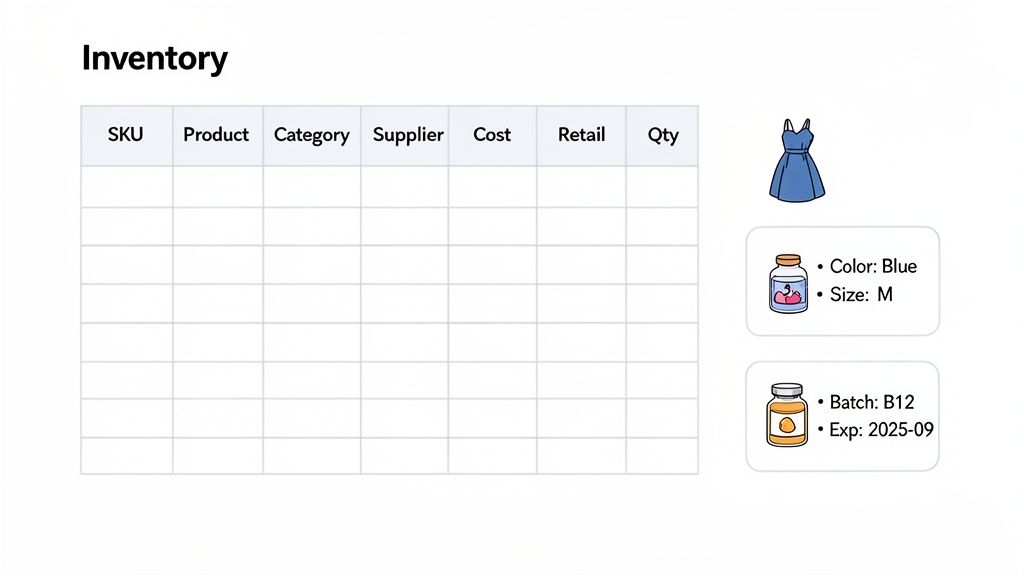
First things first, let's lay the foundation. Think of these columns as the non-negotiables. Without them, you just have a list of products, not a tool you can use to make smart decisions.
This basic structure is the skeleton of your inventory system. Each column feeds into the next, giving you a clear, immediate understanding of your stock levels and value.
A generic template is a decent start, but the real magic happens when you customize it for your industry. A one-size-fits-all approach just doesn't cut it with inventory.
If you run a fashion brand, variants are your world. You'll need dedicated columns for Size and Color. This stops you from lumping all your 'Classic T-Shirts' into one row and gives you the granular control you need over every single variant.
For a wellness or beauty company, the priorities are different. Here, Batch Number and Expiry Date are non-negotiable. Tracking this data helps you maintain quality control, follow a First-In, First-Out (FIFO) system, and guarantee you never send an expired product to a customer.
The best inventory sheet is a direct reflection of your business's unique complexities. Don't hesitate to add columns that capture the data you actually need to make decisions, not just the standard ones.
Manually typing hundreds or thousands of SKUs into a spreadsheet is a painful, error-prone nightmare. The quickest and most accurate way to get your data into this new template is by exporting it straight from Shopify.
Shopify will generate a clean CSV file with your SKUs, product names, prices, and other key details. From there, you can copy and paste this information directly into your new Google Sheet or Excel file. This simple step ensures your data is perfectly aligned from day one, avoiding the tiny typos that can wreak havoc on your entire system.
If you need a bit more guidance on getting your data ready, our guide on how to format a sample Excel file for data import is a great resource.
A static list of your products is a decent start, but a dynamic, automated sheet? That's a game-changer. This is the part where we plug in some simple formulas to turn your spreadsheet from a dumb list into an intelligent tool that does the heavy lifting for you.
By adding a few key calculations, you can slash the time you spend on manual data entry, cut down on costly human errors, and finally start making decisions based on real numbers, not just gut feelings.
First up, let's tackle one of the most fundamental metrics for any product-based business: the total value of your inventory. This isn't just an abstract number—it's the actual cash you have tied up in physical goods sitting on your shelves.
Knowing how much your inventory is worth at any given moment is critical for understanding your financial health and making smarter purchasing decisions. To get this number for a single product, you just need to multiply its Quantity on Hand by its Cost Price.
The formula for this in Google Sheets or Excel is as simple as it gets. Let's say your Cost Price is in column F and your Quantity on Hand is in column G. Just add a new column, maybe call it "Item Inventory Value," and pop this formula in for your first product row:
=F2*G2
Drag that formula down the column, and then sum the whole thing up at the bottom. Boom. You now have a real-time snapshot of your total investment in stock.
There's nothing worse than the sinking feeling of running out of a popular product. A reorder point formula is your best defense against stockouts. It tells you exactly when to restock based on your actual sales data and supplier lead times—no more guesswork.
The basic formula is: (Average Daily Sales x Lead Time in Days) + Safety Stock.
Let's walk through a quick example. Imagine you run a skincare brand and have a bestselling serum.
Your reorder point calculation would be: (10 * 14) + 30 = 170. This means the moment your stock level for that serum drops to 170 units, your sheet should flag it. It's time to place a new order.
For a deeper dive into this crucial metric, our guide on how to calculate the reorder point has a lot more detail and advanced strategies.
This simple bit of automation moves you from reactive panic-buying to proactive, data-driven inventory management. It’s your first line of defense against lost sales.
What happens when a marketing campaign suddenly goes viral, or a TikTok video drives a massive, unexpected spike in demand? That's precisely what safety stock is for. It's that extra buffer of inventory you keep on hand to guard against the unpredictable.
A common formula to figure out your safety stock is: (Maximum Daily Sales x Maximum Lead Time) - (Average Daily Sales x Average Lead Time).
This calculation forces you to plan for the worst-case scenario, ensuring you have enough stock to weather a storm. As e-commerce continues to boom, the sheer number of product variations—what the industry calls SKU proliferation—is adding a whopping +1.5% to the inventory management software market's growth. With so many products to track, trying to manage things like safety stock manually becomes nearly impossible.
When you're pulling in financial data to build these formulas, especially from invoices or supplier reports, you might find yourself needing a more advanced tool for smarter PDF to Excel conversion to ensure your numbers are always spot-on.
Getting these formulas right is the key to an intelligent inventory system. Here’s a quick-reference table to keep the most important ones handy as you build out your sheet.
| Metric | Purpose | Example Formula (Excel/Google Sheets) |
|---|---|---|
| Item Inventory Value | Calculates the total value of a single SKU. | =F2*G2 |
| Total Inventory Value | Sums the value of all your on-hand inventory. | =SUM(H:H) |
| Safety Stock | Determines your buffer stock to prevent stockouts. | =(B2*C2)-(D2*E2) |
| Reorder Point | Tells you the exact stock level to trigger a new order. | =(D2*E2)+F2 |
| Average Daily Sales | Calculates your average sales over a specific period. | =AVERAGE(SalesData!B2:B31) |
| Stock on Hand | Tracks real-time quantity after sales and receiving. | =C2-D2+E2 |
By baking these calculations directly into your inventory tracking sheet, you're not just organizing data—you're creating a powerful, responsive tool that actively helps you run and grow your business.
Let’s be honest: a perfectly designed inventory tracking sheet is completely useless if the data inside it is wrong. This is where a sustainable reconciliation workflow comes in. Think of it as the disciplined process that keeps your spreadsheet in perfect sync with the real world, preventing the small errors that can snowball into costly stock imbalances.
The whole point is to build simple, repeatable habits for daily updates and weekly checks. You don't need a complex system, just a consistent one.
Your daily routine should be quick and straightforward. At the end of each day, take just a few minutes to update your sheet with sales data from Shopify. This means decreasing the "Quantity on Hand" for each SKU that was sold. For Shopify merchants, it's also crucial to account for things that can throw your numbers off, like managing Shopify holds. This simple daily task is your first line of defense, ensuring your sheet accurately reflects what should be on your shelves.
The infographic below shows how the core formulas in your sheet should work together. This isn't just about tracking numbers; it's about turning that raw data into real, actionable insights for reordering and smart stock management.
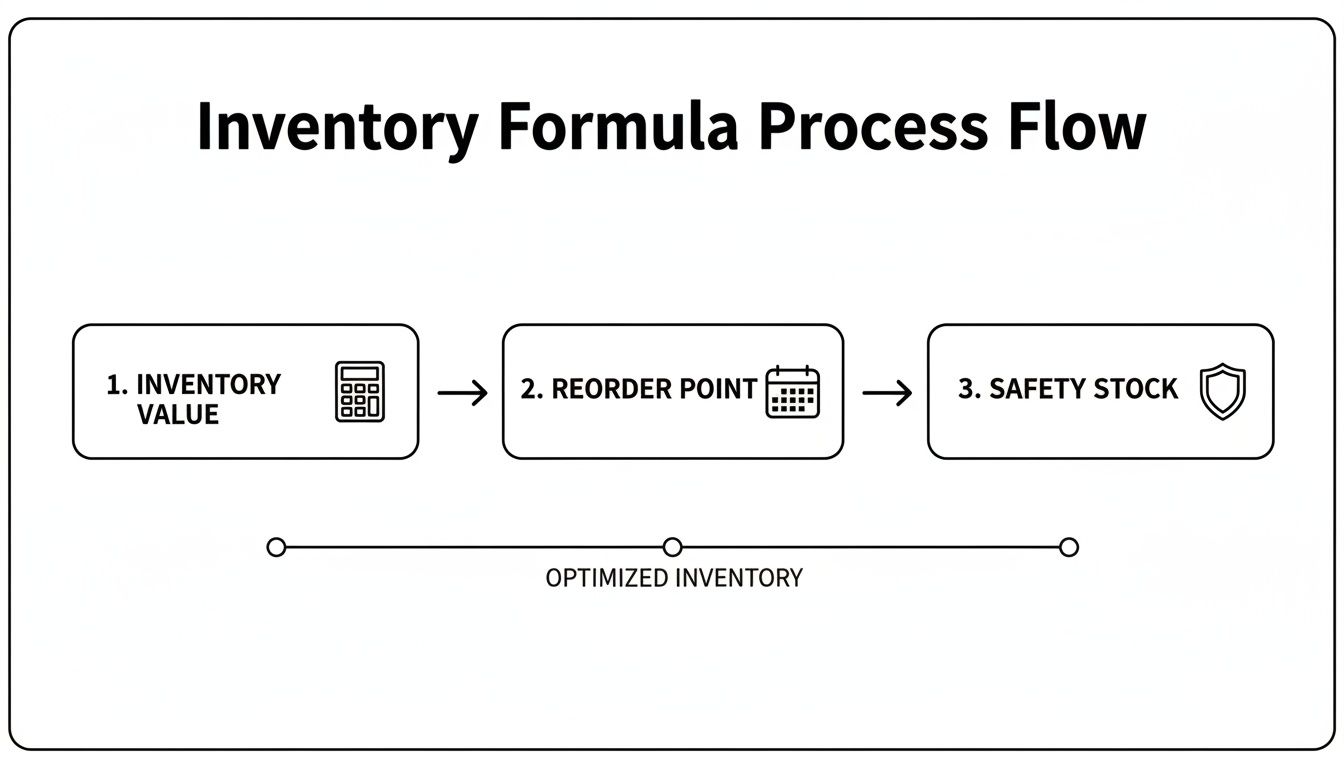
This process flow visualizes how calculating inventory value, setting reorder points, and establishing safety stock levels combine to create a proactive system, not a reactive one.
While daily sales tracking keeps your digital records current, a weekly physical count is what guarantees those records match reality. This is how you'll catch the sneaky discrepancies from returns, damaged goods, or even theft.
Instead of trying to count everything at once (which is a nightmare), adopt a cycle counting approach. The best way to start is with ABC analysis.
This prioritized approach saves a massive amount of time while focusing your energy where accuracy truly matters.
If you find a discrepancy—say, your sheet shows 100 units but you only count 98—dig in immediately. Was there a recent return that wasn't logged? A damage report you missed? Find the cause, and then adjust your sheet to reflect the truth.
A consistent reconciliation workflow isn't about achieving perfection on the first try. It's about catching and correcting errors quickly. This discipline is what builds a reliable data foundation, making your inventory tracking sheet a powerful tool for growth.
Getting this right isn't just good practice; it's where the industry is heading. In fact, by 2025, an estimated 77% of retailers plan to implement real-time inventory visibility to fight the stock imbalances that have plagued businesses recently. This just highlights why a disciplined, manual reconciliation process is so critical for growing brands today. This commitment to data integrity is what separates a useful spreadsheet from just another forgotten file.
Your inventory tracking sheet is so much more than a simple list of products. It's a living, breathing historical record of your store's entire sales journey. But now it’s time to unlock its future.
While your spreadsheet is absolutely essential for day-to-day control and accuracy, it has natural limits. It’s fantastic at telling you what you have on the shelf right now, but it can’t reliably forecast what you'll need next month. It won't automatically flag a product that's slowly but surely on its way to becoming dead stock.
This is the bridge to the next level of inventory management. The clean, organized data you've been meticulously maintaining is the perfect fuel for an AI-powered analytics platform. Think of your spreadsheet as the launchpad and AI as the rocket that gets you to true strategic foresight.

Feeding your sheet's data into a tool like Tociny.ai is where the real magic happens. Instead of you manually hunting for trends in a pivot table, the AI ingests your sales history, stock levels, and lead times to spot patterns that are pretty much invisible to the human eye. It takes you beyond simple calculations and into the realm of genuine predictive analytics.
This process shines a light on critical insights that formulas alone just can't deliver:
Your spreadsheet provides the clean data foundation; AI provides the strategic foresight that no formula can ever match. It transforms your historical numbers into a forward-looking plan for your Shopify store.
The demand for AI in forecasting is a huge market driver, adding +1.2% to the inventory software market's growth. Why? Because AI-driven platforms help direct-to-consumer brands slash their overstocks, which often tie up 20-30% of their capital in unsold goods. By combining your historical data with market signals, these tools offer precise stock predictions that protect your cash flow. You can read more about these transformative industry trends and see the impact for yourself.
Ultimately, this whole evolution is about one thing: making smarter, faster, and more profitable decisions.
Your inventory tracking sheet template is an incredible tool for managing the day-to-day chaos. But pairing it with AI analytics is how you start winning tomorrow. It gives you the power to order the right amount of stock at the perfect time, maximizing every sales opportunity while minimizing the cash you have locked away in your warehouse.
Instead of just reacting to stockouts or scrambling to deal with overstock, you start to anticipate them. This proactive approach, built on the solid foundation of your well-maintained spreadsheet, is what separates growing brands from the ones that stagnate. It’s the final step in turning your simple data into your most powerful strategic asset.
When you're trying to get a handle on your inventory with a spreadsheet, you’ll inevitably run into a few tricky situations. It’s one thing to build the template, but it’s another thing entirely to use it day in and day out. Let’s walk through some of the most common questions and roadblocks Shopify merchants face.
This one trips up everyone at some point. Let's say you sell a "Skincare Starter Kit" that includes a cleanser, a serum, and a moisturizer. It's a classic inventory puzzle because you don’t actually stock a "kit"—you stock the individual items inside it.
The golden rule here is to track the components, not the bundle.
Your master inventory sheet should only list the SKUs for the individual products you can actually pick off a shelf: the cleanser, the serum, and the moisturizer. When a bundle sells, your daily check-in process needs to reflect that sale by reducing the stock of each individual component by one.
Resist the temptation to create a "bundle SKU" in your main tracking sheet. It seems logical, but it will completely throw off your stock counts and make any real forecasting impossible for the individual items.
Every time a kit sells, you have to manually adjust the stock for each item in that kit. It takes discipline, but it’s the only way to keep your component-level inventory accurate and avoid overselling an item just because it’s part of a popular bundle.
Ah, the great spreadsheet debate. The truth is, both Google Sheets and Microsoft Excel are more than capable of handling your inventory tracking. The best choice really boils down to how your team operates.
For most Shopify stores just starting with a spreadsheet system, I'd lean towards Google Sheets. The ease of sharing and real-time collaboration is usually the most practical benefit.
Let’s be honest: human error is the biggest enemy of an accurate inventory sheet. A single typo can mess up your reorder points, leading straight to a stockout or expensive overstock. The usual suspects are misspelled SKUs, forgetting to update the "Quantity on Hand" after a sale, or fumbling a cost-of-goods calculation.
The best defense is a good offense, and that means using data validation.
You can set up rules for specific cells in both Excel and Sheets. For instance, you can create a dropdown menu for your SKU column that only contains your official, valid SKUs. This makes it physically impossible for someone to type "TSHIRT-BLK-LG" when it should be "TS-BLK-L." It’s a simple feature that enforces consistency and cuts down on those tiny mistakes that cause massive headaches later.
Tired of chasing down typos and manually updating spreadsheets? Tociny.ai connects to your sales data to deliver accurate forecasts and clear inventory recommendations. It turns your spreadsheet from a reactive log into a proactive growth engine. Start making smarter inventory decisions today.
Tociny is in private beta — we’re onboarding a few select stores right now.
Book a short call to get early access and exclusive insights.