An inventory tracking spreadsheet is really just a simple, low-cost way to watch over your product levels, keep an eye on sales, and manage what your stock is worth using software you probably already have, like Excel or Google Sheets. It's a straightforward method for new and growing businesses to get a handle on their assets without shelling out for expensive software.
Before you jump into complex software, it’s worth taking a moment to appreciate why so many successful e-commerce brands get their start with a simple spreadsheet.
The biggest advantage is cost—it’s basically free if you're already using programs like Excel or Google Sheets. This zero-cost entry point frees up capital you can pour into other critical areas, like marketing or product development.
Another huge benefit is the sheer level of customization. Unlike rigid software with fields you can't change, a spreadsheet is a blank canvas. You can build a system that perfectly mirrors your unique workflow, adding or removing columns as your business evolves.
Think of your first inventory tracking spreadsheet not as a permanent solution, but as a hands-on training ground. It forces you to engage directly with core inventory concepts, providing a deep, practical understanding you can’t get from automated dashboards.
This hands-on approach really helps you internalize the relationships between your stock levels, how fast things are selling, and how long it takes to get more from your suppliers. It builds a foundation of knowledge that makes you a much smarter operator in the long run.
Even with the inventory management software market blowing up into a multi-billion dollar industry, spreadsheets are still the go-to for countless small and mid-sized retailers.
While the global software market was valued at USD 3.58 billion and is projected to more than double by 2033, a huge number of e-commerce merchants are still managing their stock the old-fashioned way. This really speaks to the spreadsheet's value as an accessible, effective starting point. You can dig deeper into the inventory management market by checking out the full report.
Ultimately, starting with a spreadsheet accomplishes two key things:
Alright, let's move from theory to actually building this thing. It's time to roll up your sleeves and create the spreadsheet that will become the command center for your entire inventory operation.
Whether you're a fan of Google Sheets or prefer Microsoft Excel, the principles are the same. Our goal isn't just to make a list of your products; it's to build a clear, organized system that gives you total visibility into your stock from day one.
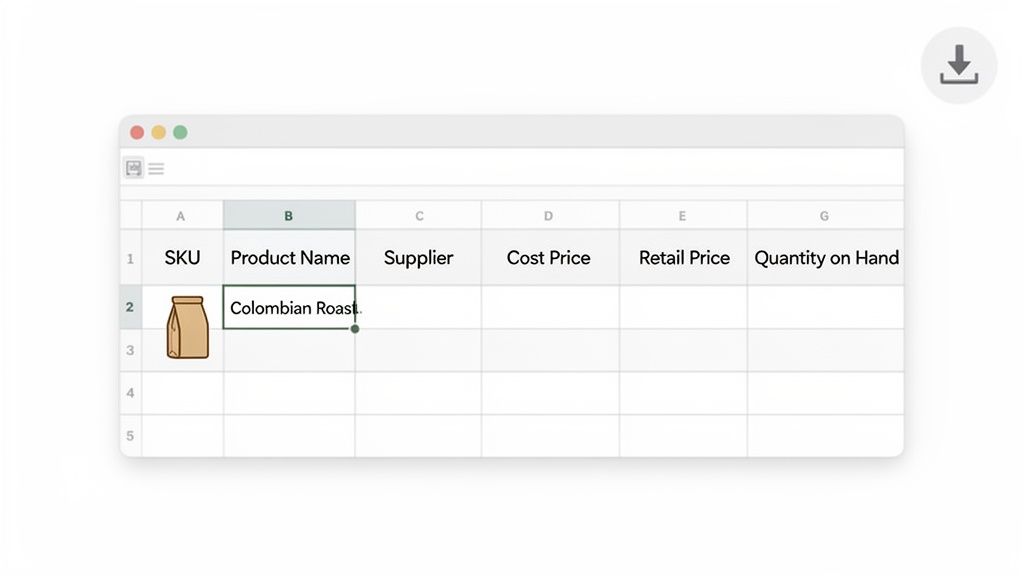
We'll start with the absolute essentials—the columns that every e-commerce business needs, no matter how big or small. Think of these as the vital signs of your business. They form the non-negotiable backbone of your inventory system.
Every solid inventory sheet I've ever built starts with the same core data points. These fields give you the basic, ground-level information you need to track what you have, where it came from, and what it’s actually worth to your business.
To make this real, let's pretend you're running an online store selling specialty coffee beans. Your first move is to open a blank sheet and create headers for these fundamental columns.
Here's a quick rundown of what you'll need, why it matters, and what it looks like in practice.
| Column Name | Description | Example Data |
|---|---|---|
| SKU (Stock Keeping Unit) | A unique code for each product variation. This is your internal product identifier. | ETH-YIRG-12OZ |
| Product Name | A clear, descriptive name for the item. Be specific for easy identification. | Ethiopian Yirgacheffe - Whole Bean - 12oz |
| Supplier | The company you purchase the product from. Essential for reordering and tracking vendor performance. | High Altitude Coffee Importers |
| Cost Price | What you pay your supplier for a single unit. Crucial for calculating profit margins. | $8.50 |
| Retail Price | The price you sell one unit for to your customers. | $19.99 |
| Quantity on Hand | The total number of units you physically have in stock right now. This is your most dynamic column. | 150 |
Getting these columns right is more than just data entry; you're establishing the single source of truth for your entire business. When every item has a unique SKU and its costs are clearly defined, you eliminate the guesswork that sinks so many new stores.
Once you have that solid foundation, it's time to layer in some more advanced fields. This is where your spreadsheet starts to evolve from a simple list into a powerful decision-making tool.
These next columns give you a much deeper understanding of your inventory's financial value and, more importantly, its true availability.
Here are the high-impact columns I always recommend adding next:
Structuring your sheet this way creates a logical flow. You can see at a glance what you physically own, what's already been promised to customers, and what's genuinely left to sell.
If you want a head start, our downloadable template for an inventory list gives you a pre-built structure to work from. It's a great way to skip the setup and get right to the tracking.
A static list of products and quantities is a good start, but it's just raw data. The real magic happens when you use formulas to make that data work for you. This is where your simple spreadsheet evolves into an intelligent tool that flags problems and helps you make decisions.
Instead of manually checking stock levels and guessing when to reorder, you can build a system that automatically calculates what you need and when. Think of it as the first step toward creating a powerful, proactive inventory dashboard right inside a tool you already know how to use.
The reorder point is arguably the most important number in your entire inventory system. It's the specific stock level that screams, "Hey, it's time to order more of this before you run out!" Nailing this prevents those dreaded stockouts, keeps sales flowing, and ensures your customers aren't left disappointed.
The basic formula is pretty straightforward:
(Average Daily Sales x Lead Time in Days) + Safety Stock = Reorder Point
Let's quickly unpack that:
So, if you sell 10 t-shirts a day and it takes your supplier 7 days to deliver a new shipment, you'll burn through 70 shirts while you wait. That means you need to reorder long before your stock hits zero.
Getting your reorder point right is fundamental. It’s the trigger that keeps your supply chain humming, transforming a chaotic, reactive process into something predictable and automated.
Safety stock is your insurance policy against the unpredictable nature of e-commerce. It’s that extra pile of inventory you keep on hand to avoid stocking out when a product suddenly goes viral or your supplier’s truck gets a flat tire.
A common way to calculate it looks like this:
(Max Daily Sales x Max Lead Time) – (Average Daily Sales x Average Lead Time) = Safety Stock
Let's use a real-world example. Say you sell a popular coffee mug. Your average daily sales are 10 units, but on a great day, you’ve sold as many as 25. Your supplier is usually quick, delivering in 7 days, but one time it took a painful 10 days.
I know, 180 might seem like a lot. But this calculation ensures that even if you have your busiest sales day ever and your supplier experiences their longest delay, you’ll still have product to sell.
Formulas give you the numbers, but let's be honest—it's easy to miss a single number in a sea of data. Conditional formatting makes those critical numbers jump off the screen. This feature automatically changes a cell's color based on its value, creating instant visual alerts.
The most practical use for this is to highlight items that are running low on stock. You can set a simple rule: when the "Quantity on Hand" is less than or equal to the "Reorder Point," turn the cell bright red.
Here’s how to set it up in Google Sheets or Microsoft Excel:
Format > Conditional formatting.This tiny tweak is a game-changer. You no longer have to scan rows and compare numbers manually. The low-stock items find you, demanding your attention and making it impossible to miss an urgent reorder.
Let's be honest: an inventory tracking spreadsheet is only as good as the data inside it. If it doesn't match what's actually happening in your Shopify store, it quickly becomes more of a liability than a useful tool. Nailing down a disciplined workflow to keep your spreadsheet and Shopify in sync is the only way to make this manual system truly work for you.
The whole process kicks off with a clean data export from your Shopify admin. Just head over to your "Products" section and use the export feature to get a fresh CSV file. This file is your goldmine—it contains all your product details, including the all-important SKU and the current inventory levels Shopify is tracking. Think of this export as your baseline, the single source of truth you'll use to align your master spreadsheet.
This flow chart breaks down the core triggers your spreadsheet will help you manage, which is the "why" behind keeping everything synced up.
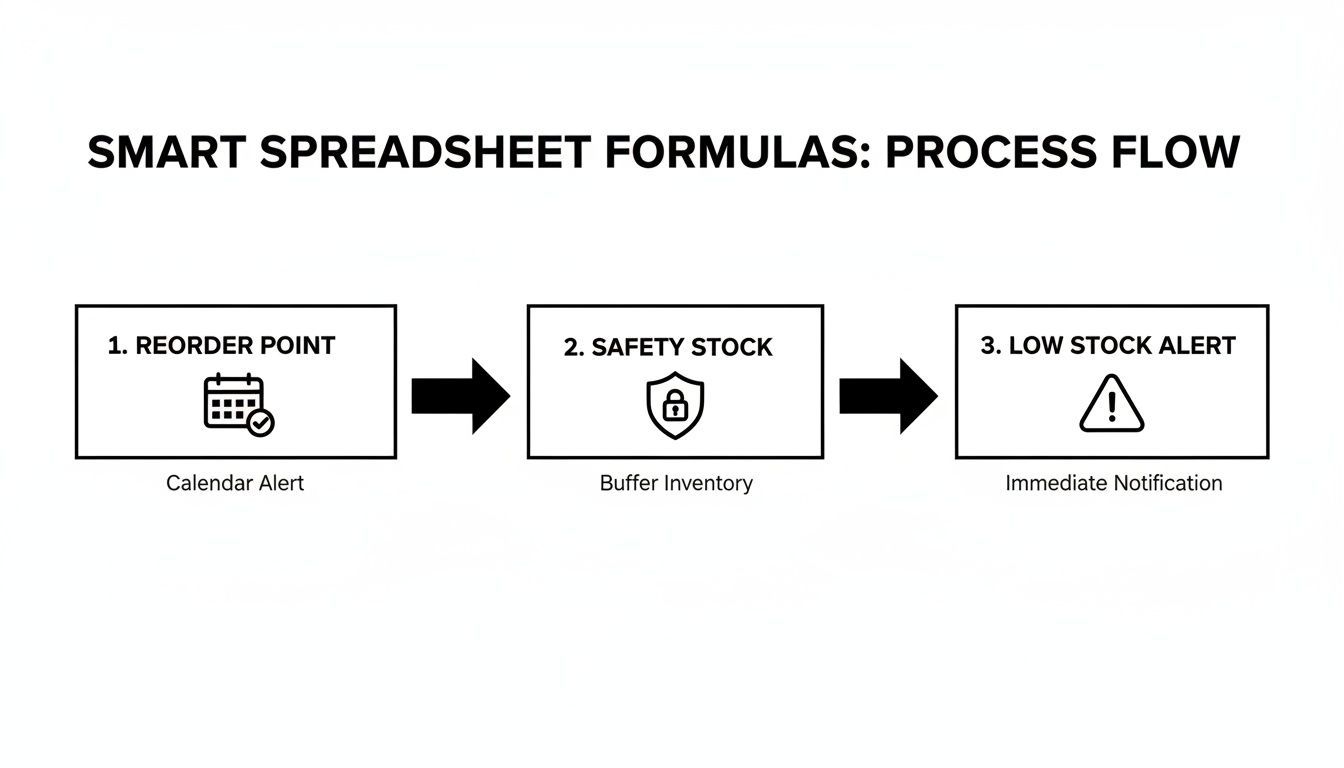
As you can see, it’s all about creating a proactive system. By calculating reorder points, setting safety stock, and getting low-stock alerts, you’re staying ahead of inventory problems before they can hurt your sales.
Here’s where this workflow really starts to shine: making bulk changes. Imagine a new shipment arrives with 50 units of a popular SKU. Instead of the soul-crushing task of updating each product one-by-one in Shopify, you just change the number in your "Quantity on Hand" column. This is also the perfect way to true-up your numbers after a full physical stock count.
Once your spreadsheet has the new, accurate quantities, you'll prep a simplified CSV file to send back to Shopify. This file only needs two columns: SKU and the updated Quantity. Shopify is smart enough to use the unique SKU to find the right product and overwrite the old inventory number with your new one. You have to be meticulous here—a single mismatched SKU will cause the import to fail for that row.
The classic failure of a spreadsheet system is the lag. Manual counts almost instantly fall out of sync with what's happening in the warehouse, and that's how stockouts and overselling begin.
This manual sync process, while it works, really highlights the biggest challenge of relying on spreadsheets. That delay between a physical stock change and a spreadsheet update creates dangerous blind spots. While modern inventory systems often sync hourly to close that gap, a disciplined daily or even weekly update routine can keep your spreadsheet reliable enough to be useful. To head off common import problems, check out our guide on how to format sample Excel files correctly.
Ready to push the update? Go back to the "Products" section in your Shopify admin and select "Import." Upload your simple two-column CSV, and Shopify will map the data and update your stock levels in one go. It's a simple, repeatable process that transforms your static spreadsheet into a genuinely dynamic tool for managing your store.
An inventory tracking spreadsheet is an incredible starting point. It gives you control and a ton of insight without any upfront cost, which is exactly what a new business needs. But for a growing brand, there’s always a tipping point where this trusted tool starts creating more problems than it solves.
Recognizing that moment is key to scaling smoothly without sacrificing profits or your hard-earned customer satisfaction.
The first warning signs are usually subtle. You start spending more and more of your day just updating the sheet, not actually analyzing the data inside it. Small but frequent data entry errors begin to creep in, throwing off your stock counts and leading to surprise stockouts of your most popular items.
Before you know it, you're trying to manage inventory across a second warehouse or a 3PL partner, and that single spreadsheet becomes a massive bottleneck, constantly out of sync.
These friction points aren't just minor annoyances; they have a direct financial impact. Every manual error can lead to ordering too much of a slow-seller—tying up cash in dead stock—or running out of a bestseller, which means lost revenue and unhappy customers.
The time your team spends triple-checking numbers is time not spent on marketing, product development, or talking to your customers. It's a hidden cost that adds up fast.
The moment your spreadsheet requires more administrative effort to maintain than the strategic value it provides, you've hit the ceiling. It's a clear signal that your operational complexity has surpassed the system's capabilities.
Cloud-based tools have completely changed the game here, significantly lowering the barrier to entry for small and mid-sized businesses. In fact, SMEs are now the fastest-growing customer segment for inventory software. These modern systems centralize data, automate reordering, and even forecast demand using your sales history—tasks that are notoriously difficult and error-prone in a spreadsheet.
This transition doesn't mean your spreadsheet journey was a waste. Far from it. All that hands-on work has prepared you to understand precisely what you need from a more powerful system. While a spreadsheet is an excellent starting point, understanding comprehensive approaches can help businesses scale. For further insights, explore the best practices for inventory management.
Moving to a dedicated platform is the natural next step. If you're running into these challenges, it might be time to explore the various inventory management tools for small business that offer automation, real-time tracking, and predictive analytics to support your growth.
Even the most detailed guide can't cover every specific scenario you'll run into. When you're in the trenches building your own inventory spreadsheet, questions always come up. Here are a few of the most common ones I hear from merchants, along with some practical, straight-to-the-point answers.
You sure can, but you need to be incredibly organized. The best way to tackle this in a spreadsheet is by giving each location its own dedicated column.
So, instead of a single Quantity column, you'd have something like Warehouse A Quantity, Retail Store Quantity, and so on. Then, you can add a Total Quantity column that simply uses a SUM formula to add them all up. This gives you a bird's-eye view of your total stock while also showing you exactly where it is.
The real bear here is the manual upkeep. Keeping those numbers perfectly synced across locations in real-time is a massive challenge without a disciplined, daily reconciliation process. Honestly, this is one of the first major growing pains that pushes businesses toward a dedicated inventory system that syncs everything automatically.
If there's one thing that will absolutely tank your inventory spreadsheet, it's inconsistent data entry. A single forgotten return, a typo when logging a new shipment, or team members using different formatting—it all snowballs until your data is completely unreliable.
And once you can't trust the numbers, the whole spreadsheet becomes worthless. To get ahead of this, there are a few things you should do from day one:
Ah, product bundles. They're a classic spreadsheet headache, but you can definitely manage them with some clever setup. The trick is to treat the bundle itself like a unique product with its own SKU.
The magic happens when you link the sale of that bundle back to its individual components. For example, if you sell a "Coffee Lover's Kit" (your bundle SKU), you need a process—or a more advanced formula—that automatically deducts one unit from your "12oz Coffee Bag" SKU and one from your "Branded Mug" SKU every time the kit is sold. It’s a bit fiddly to set up and is a perfect example of a complex task that dedicated inventory management software is designed to handle without breaking a sweat.
Ready to move beyond the limitations of manual tracking? Tociny.ai uses AI to provide Shopify merchants with clear sales insights, predictive forecasting, and actionable recommendations to eliminate stockouts and reduce overstock. Ditch the spreadsheet errors and start making smarter inventory decisions.
Tociny is in private beta — we’re onboarding a few select stores right now.
Book a short call to get early access and exclusive insights.